How to setup a customer portal for configured products

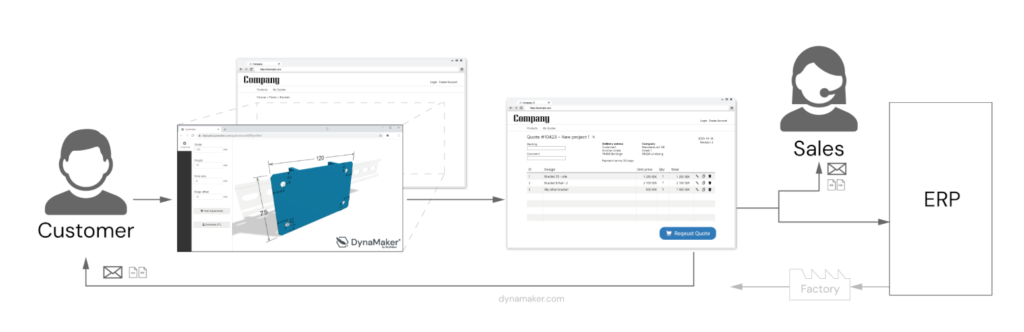
Having a customer portal, or B2B e-commerce, on your site can really help with getting more engagement, sales and quotation requests from your customers and distributors.

There are however many ways to setup your customer portal to get the proper automation and workflows. Therefore we will cover our favorites in this article.

Free CAD file conversion online: STEP to binary GLTF

When developing a CAD configurator intended to be used online in a e-commerce or a website you really need to have lightweight 3D files in a compressed format. Since state of the art in lightweight and compressed 3D format today is the binary version GLB of GLTF file format, we have created the GLBIFYER as an free online conversion of STEP files to GLB that is all handled in a secure way on your local browser.

What is visual product configuration?

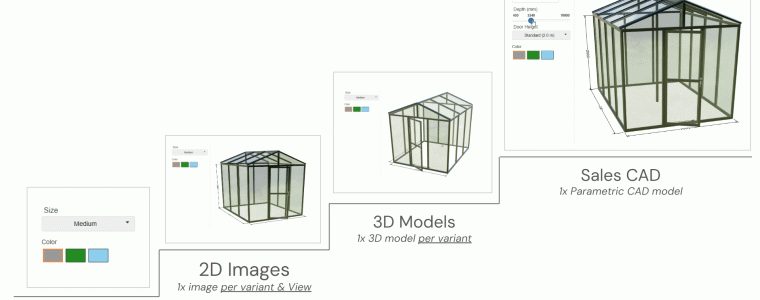
When you want sell a product in more variations than small, medium and large, you usually need some way to guide the user and handle the available variations. This is where product configuration software comes in to help the users make choices and verify that the it’s possible to combine the choices in the requested way. Adding interactive product 2D/3D-visualization to a product configurator just makes it easier to use for new people and makes them more comfortable with buying the product.

Generating STEP-files from online CAD geometry

Would you like to develop a online CAD configurators that automatically exports STEP-files of your assemblies?

The CAD visualization in DynaMaker can be exported as step in two main ways:

  • Lightweight direct export of everything you see as Step AP242 (read in the step export section of docs.dynamaker.com)
  • Original file STEP export by swapping of lightweight 3D files with original STEP files via REST API (read about our Design Automation plugin in docs.dynamaker.com)

How to use 3D visualization files (.stp, .gltf and .stl) in your online CAD configurator

Do you already have your own 2D & 3D files? Then it’s very easy to reuse them in DynaMaker without remodeling them again. If there are parts in your product that remain unchanged regardless of the configuration (“static”), you can reuse your 2D & 3D files in DynaMaker for them, so that you can focus on parametric parts and others in your DynaMaker application. Learn more about this!

IT Map for Manufacturing Companies

We often get asked about the IT structure and systems needed to make product configuration and process automation happen. How are different parts connected to each other? Which departments in the company uses which systems? And how do they relate to the flow of products from purchase to delivery? Have a look at this IT map for manufacturing companies.

Start fast with CAD configurator templates

With the increasing demand for customized products, providing your customers with a web-based and easy-to-use configurator for your product is profitable in many ways. Instant quotations, significantly reduced strain on the sales and engineering personnel, and high-quality input for manufacturing are just some of the benefits!


How to use WordPress for RFQ with CAD

The CMS platform WordPress is one of the most popular ones to build your homepage on the web. Therefore it can be a natural starting place for enabling quote requests by customers and distributors (RFQ).

We have developed a free wordpress plugin to easily embed your visual product configurator on your favorite WordPress website and provide a starting point for configuration and a low budget customer portal.