In complex product configuration the checkout page for working with your quotation and eventually submitting it as a request for quote is a critical part of a customer / distributor portal. Since the product configurators usually submits their bill of materials (BOM) directly to the checkout it needs to handle all the back and forth navigation in addition to price calculations and typical actions that you would expect. This also applies to a regular e-commerce cart if a complex configured product is purchased direct instead of via quote.
The typical checkout page and its features
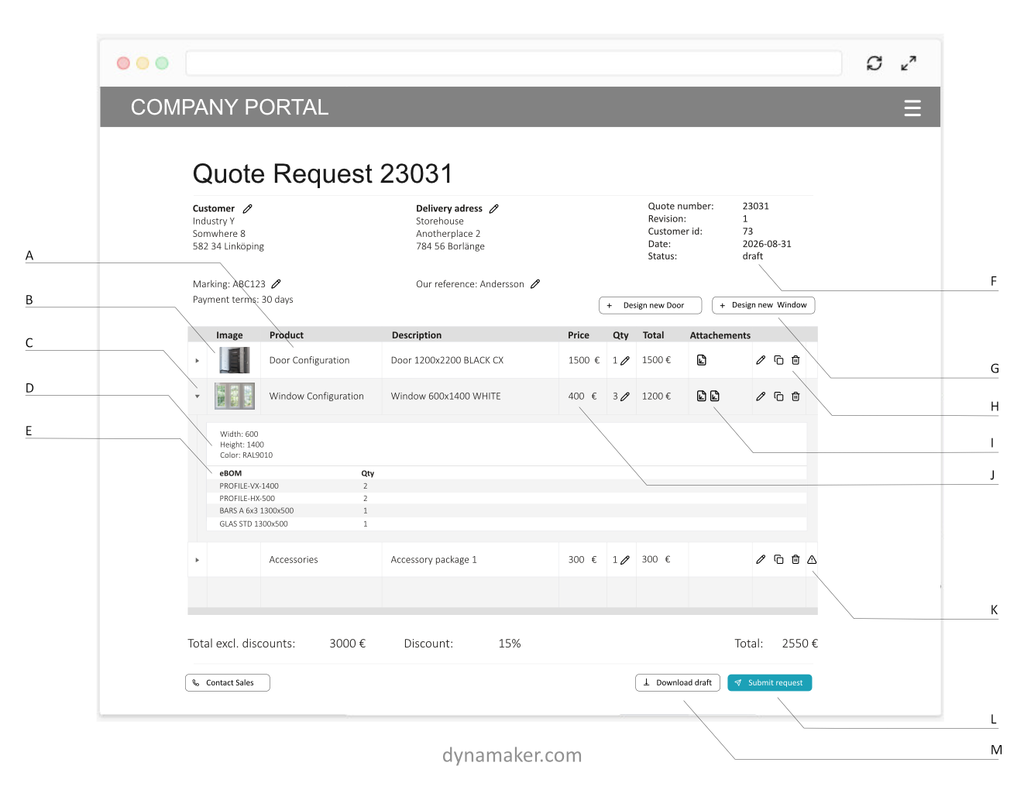
A: Open & edit configurations
A configured product needs to be possible to open and edit again. So each row contains the data needed to open an old configuration and submit an update to the checkout page (as long as status F is draft).
B: Preview image of row content
Each row should have a small preview of the configured product, or at least a placeholder image for that type of product.
C: One configuration per row
Since a configured product requires more data than a fixed SKU, each checkout row corresponds to a configuration and needs to contain a full set of data. Can optionally be expanded if the configuration data is relevant to the user (otherwise hidden in the background).
D: Internal meta and variables for each row
Detailed descriptions and meta information can be connected to the configuration row.
E: Internal eBOM for each row
The product configurator can generate a predictable and detailed sales / engineering BOM (eBOM) that can be used in a price engine instead of having fixed prices per SKU.
F: Status of checkout controls what is possible
Working with the checkout page is usually tightly connected to a state of the current request. Common states are draft, submitted, approved, order where the user only can modify what’s in the checkout while in the draft stage.
G: Shortcuts to add more the checkout
It’s a long way to force the user to product pages after a configured item is added. Adding easy to access links to create another item can help.
H: Duplicate & delete
Duplicating a row is a common feature that helps make a complete solution to quote. Delete is equally important to clean up the mess. Optionally an extra edit icon can be added in case the user misses that the headline can be clicked (see A).
I: Document attachments for each row
Connecting a quote drawing, BIM-file or technical diagram to each row is important to ensure that the buyer understands what has been purchased. Preferably done on a row level, but attachments can also be added for the whole document.
J: Price engine calculates price from eBOM
Having price formulas per product configurator ensures that the eBOM can be turned into a correct selling price.
K: Highlight warnings & errors
Having rule guided product configurators should never result in errors. However, there is always a risk for errors or warnings, so this needs to be highlighted. Two typical errors that can occur on a row are: 1. missing attachments (failed on generation), 2: unexpected eBOM item (sync not up to date). It’s recommended to allow submitting a request even with warnings but ensure that sales get noticed of this.
L: Easily submit quote requests
It should be easy to submit a request with a button. Expressing it as a quote request instead of an order makes users feel secure in clicking the button. After submission the status of the request should change from draft to submitted (see F).
It’s recommended to have two behaviors of the submit button:
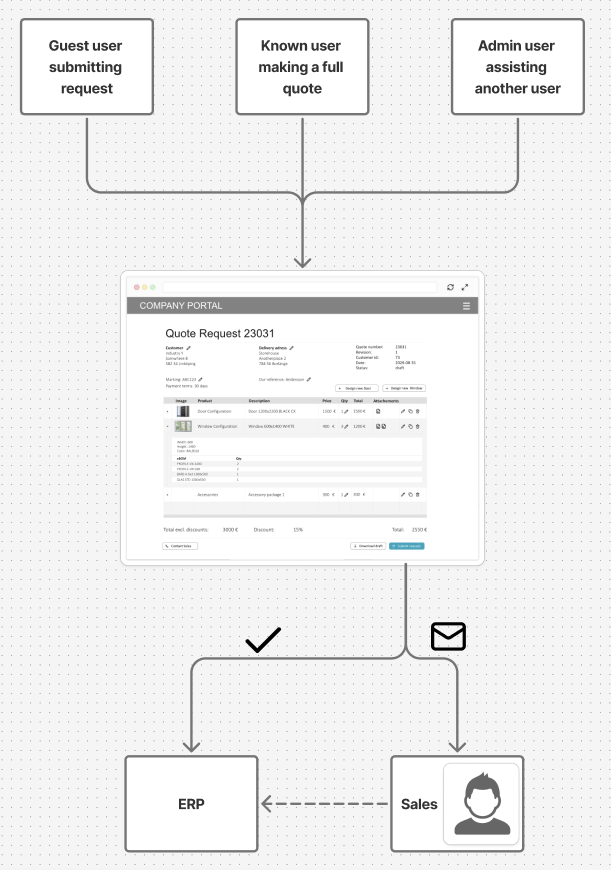
- If everything is correct, the button sends the request directly to ERP (whatever system that accepts the request)
- If the request contains warnings, errors or price can’t be computed properly, the request button sends the request as an email to sales with the information from checkout.
The reason for this dual behavior is to ensure that the user never reaches a dead end not being able to submit their request. If there are problems it’s up to the internal team to handle the request manually and while IT fixes the problem with checkout.
M: Enable draft download of checkout
Having the possibility to download a draft of the checkout is very helpful to encourage iterations of the best possible offer. It enables sharing, discussion and comparisons before making the formal quote request.
How checkout handles different user roles and checkout behaviour
It’s critical that the checkout page adapts to the role of the user that is using it. An unknown user without proper customer data should not see prices and only be able to submit the request. A know user should be able to do and see more since it has the chance to be properly set up with the correct price list or organization. Sales admin users should also be able to assist on other users and sometimes override what the customer is (since they are not selling to themselves).
It’s also important that the submit request always works for the user. Even if the user is a guest and has limited capabilities he or she needs to be able to submit what they are asking for so that somebody can react to it, as long as mandatory fields are filled (contact information, etc)
To get the submit button to always work even if there is missing data or errors you should have two behavior of the button
- If all information is present and everything is in order it will be sent direct to the ERP (or other master system like CRM).
- If information is not compete, or if there are warnings / errors, the information will be sent via email to sales & IT to manually handle and figure out how to solve the users request manually (and fix the warning / error until next customer show up).