If you searched “automatic BOM” or “BOM automation,” you already know the problem — you’re just looking for the fix. So: quick context check before anything else. If you make one fixed product and just want your ERP or PLM system to spit out its BOM faster, this isn’t that post — your ERP’s BOM module is probably already the right tool, and you should go bug your PLM vendor instead. This post is for the opposite case: your product changes shape depending on what the customer orders, and building the parts list is something a person has to redo, by hand, every single time. If that’s you, keep going.
Many engineers keep old BOMs at hand for responding to a new request. Every time a custom request comes in — a longer version, a different mounting bracket, one extra shelf — the move is to duplicate the closest previous BOM, rename it, and start hunting for what actually changed. Ninety percent of the parts list is identical. It’s the other ten percent that gets you. Imagine shipping an order missing eight M8 washers because the length changed by 200 mm and the fastener count scales with it — an easy thing to forget when you’re re-deriving it from memory instead of a rule. Nobody died. But someone spent a Tuesday afternoon on the phone with a customer explaining why their delivery was incomplete, which is its own kind of punishment.
If any of this sounds familiar, you’re not bad at your job. You’re doing a job that shouldn’t be manual in the first place.
Where BOMs quietly go wrong, over and over:
- You copy the BOM from “the closest previous order” and forget to update a quantity that scales with a dimension (fasteners, panels, brackets — anything tied to length or count).
- The customer approves a quote, then changes one option afterward, and now you’re back in the CAD file recounting parts by hand instead of just re-quoting.
- Sales builds their own version of the BOM from the quote, engineering builds another from the drawing, and the two don’t match by the time it reaches the shop floor.
- A part number gets fat-fingered under deadline pressure and the wrong variant of a bracket gets pulled from the shelf.
- You’re deriving a fastener or component count from a 2D drawing that was never fully dimensioned for that purpose, so you’re estimating instead of counting.
- The BOM logic — which options need which parts, in what quantities — lives in your head or in a spreadsheet only you understand, so a week of vacation becomes a week of your phone buzzing.
In this post we’ll walk through the different ways people try to automate a BOM (and why most of them don’t work for custom, made-to-order products), what it looks like to have the BOM fall out of the configuration automatically instead of being built by hand, and a few concrete situations where that difference actually matters on a Tuesday afternoon.
01 The Different Ways People Try to Automate a BOM.
“BOM automation” isn’t one thing — it depends on what’s actually driving the parts list. Worth being honest about the options, because two of the three don’t really solve the made-to-order case:
ERP/PLM-driven BOM automation
Your ERP or PLM system generates the BOM for a defined product structure. Great if you make a fixed set of SKUs. Falls apart the moment “the product” isn’t one thing — a made-to-order variant with a customer-chosen length, layout, or option set isn’t a SKU your ERP already knows about, so someone still has to define it by hand before the system can do anything with it.
CAD-driven BOM extraction (macros, scripts, exported tables)
You script your CAD tool to pull a parts list off the model. This genuinely works — right up until your option count grows. Every new variant path is another edge case in the script, and the script becomes another piece of tribal knowledge someone has to maintain, which is the same single-point-of-failure problem in a different file format.
Configuration-driven BOM generation
The parts list isn’t extracted or scripted after the fact — it’s a direct consequence of the product rules themselves. You define once which components and quantities apply to which options and dimensions; every valid configuration a customer or salesperson selects already implies its own BOM, because the system that validated the configuration is the same system that knows what’s in it.
That third one is the category a visual product configurator falls into, and it’s the one built specifically for “the product is different every time, but the rules for what’s in it aren’t.”
02 This Isn’t a Spreadsheet Problem. It’s a Configure-to-Order Problem.
Zoom out and the pattern repeats across every manufacturer that sells configurable products instead of one fixed catalog item: shelving systems, industrial enclosures, fencing, machine components, countertops. Anywhere a customer can say “same thing, but longer” or “same thing, but with the other mount,” someone on the inside has to translate that sentence into a parts list, by hand, under time pressure, correctly, every single time.
The manual BOM isn’t really the problem — it’s a symptom. The actual problem is that the knowledge of “which parts and how many, for this specific configuration” only exists in one place: a person’s head, or a document that person maintains. Every manual BOM is that knowledge being re-derived from scratch, which means every manual BOM is a chance for it to be derived wrong. This is a production problem wearing a spreadsheet costume, not a sales problem or an Excel-skills problem.
03 Where the BOM Actually Comes From
This is the part where the fix isn’t “get better at Excel” or “write a better macro” — it’s “stop deriving the parts list after the fact, and let it fall out of the same data that defines the product.”
That’s what a visual configurator does that a spreadsheet template or CAD script can’t: it holds the actual product rules — which components exist, how quantities scale with dimensions, which options are even compatible with each other — in one place. A customer (or your sales rep) configures the variant they want, the configuration gets validated against those rules so only buildable combinations are selectable, and because the system already knows exactly which parts and quantities are involved, the parts list comes out the other end instead of being reconstructed by a person.
We build this with DynaMaker, a platform for building the kind of visual, web-based configurator that does this — you define your product’s parametric rules once, and every valid configuration that comes through is one the system has already confirmed can be built, without you personally checking it.
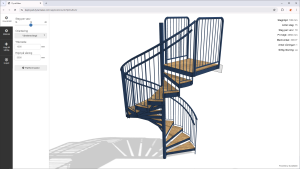
You can also poke at a live example configurator here on our website.
04 Where This Actually Fixes Something.
Same list as before, mirrored against what changes when the configuration — not a person — is doing the counting:
- The length changes after the quote’s approved? The configurator recalculates every quantity tied to that dimension — fasteners, panels, brackets — automatically. Nobody has to remember which line items scale with length.
- Sales and engineering see different versions of the same order? They don’t, because there’s only one version: the configuration. What sales submits is what production receives.
- A part number gets mistyped under deadline pressure? There’s no typing — the configurator only allows part/quantity combinations that are valid for that configuration, so a wrong bracket can’t slip through because it was never a selectable option in the first place.
- You’re estimating a fastener count from an underdimensioned drawing? You’re not estimating anymore. The count comes from the same parametric model the drawing is generated from, so it’s exact by construction.
- The BOM logic only lives in your head? It lives in the configurator’s rules instead — documented as product logic, not tribal knowledge, so it survives you taking a vacation or someone new joining the team.
- A one-off request needs a one-off BOM? It gets one, automatically, the same way every other configuration does — one-off stops meaning “manual.”
05 Where to Slot This Into Your Process.
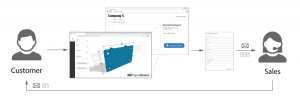
The natural point to introduce this is right where the manual BOM currently gets built — the moment a custom request turns into something that has to be quoted and eventually produced. If that request currently lands as an email or a call, a configurator can sit in front of that step (embedded on your site, or used internally by sales as an order-entry tool) so the configuration — and its parts list — exists before anyone opens a spreadsheet. If you’re mid-process, you can also start narrower: build the configurator for your highest-volume or most error-prone product line first, run it in parallel with your current process for a few orders, and let the BOMs it produces earn your trust before you retire the spreadsheet.
06 Quick Answers.
Can a BOM be generated automatically from CAD? Yes, if the CAD model is parametric and the parts/quantities are tied to that same logic — that’s effectively what a configurator does under the hood. A one-off macro pulling a static parts list off a single CAD file is a narrower, more brittle version of the same idea.
What’s the difference between BOM automation and a product configurator? “BOM automation” describes the outcome — a parts list you didn’t build by hand. A product configurator is one way to get there, specifically suited to products that change per order. ERP/PLM BOM automation is a different way, suited to fixed product structures.
Does ERP or PLM software automatically generate BOMs? Yes, for product structures already defined in the system. It doesn’t help with the step before that — defining what “this specific custom order” actually contains — which is the step a configurator handles.
How do you automate a BOM for made-to-order or configured products specifically? By capturing the product’s rules (components, quantities, compatibility) in a configurator once, so every valid configuration a customer selects already implies its BOM, instead of a person re-deriving it per order.
Try It on Your Own Product Line
You don’t need to buy anything to see if this holds up — build a configurator for free and see whether it actually validates a real request the way you would.