How to create a maintainable CAD configurator structure
TL;DR
Creating stuff is easy. Creating structure is hard
It’s easy to end up with a mess that is very hard to maintain. When building a product configurator with CAD parts we recommend having several layers to hide complexity and make sure each module can be edited without too much side effects on other components.
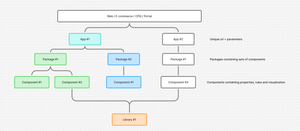
This is the recommended structure in DynaMaker Studio
Your Website / e-commerce / CPQ / portal can contain multiple Applications (one unique url-adress per application)
Your Application can contain multiple Packages (bundling sets of components, and may contain sub-packages)
Your Package can contain multiple Components (assembly structures, 2D/3Dvisualizations, CAD parts, rules, user inputs)
Your Component can contain internal Components and reference other Packages (sub-assemblies, internal parts)
Your Application can reference multiple Libraries
Your Library can contain multiple Components that you want to share between Applications
A rule of thumb could be that you need one application per product family in your commerce, ERP or CPQ. Whatever you use to bundle a specific set of pricing, product and data is usually a good starting point.
“We should NOT mix gym equipment and wall decorations our ERP. They are both sold and manufactured differently!”
– Engineer that have to clean up the mess
If you want advice around your current structure please reach out to our support and we gladly discuss tactics.